> ## Documentation Index
> Fetch the complete documentation index at: https://moengage-docs-limits-flows.mintlify.site/llms.txt
> Use this file to discover all available pages before exploring further.
# How to Use the Delete API Through a Connector Campaign to Delete Multiple User Profiles?
> Delete multiple user profiles in MoEngage without developer help. Use the Delete API via a connector campaign with a custom user segment to bulk remove.
You can use the Delete API through a connector campaign to delete multiple user profiles without requiring a development or IT team.
## Instructions
Perform the following steps:
1. **Create a custom segment:**
* Identify all users you want to delete from MoEngage and create a custom segment for them.
2. **Set up a connector campaign:**
* Create a **One-Time Custom Connector campaign**.
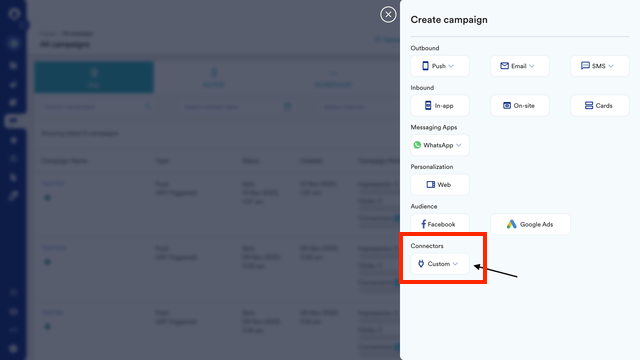 * Select the custom segment created as the Audience for this campaign
 3. **Configure the API request:**
* In the Step 2 **Content** page, add the API information in a POST call with appropriate headers and key-value pairs.
3. **Configure the API request:**
* In the Step 2 **Content** page, add the API information in a POST call with appropriate headers and key-value pairs.
 * Use the following keys and values:
* Key: identity\_type ; Value: customer\_id
* Key: identity\_value; Value: Use @ to personalize the ID dynamically for this key.
* Refer to the [sample cURL request for the Delete API](https://www.moengage.com/docs/api/user/delete-users).
* Use the following keys and values:
* Key: identity\_type ; Value: customer\_id
* Key: identity\_value; Value: Use @ to personalize the ID dynamically for this key.
* Refer to the [sample cURL request for the Delete API](https://www.moengage.com/docs/api/user/delete-users).
 4. **Set delivery control:**
* To avoid request failures, set the request limit in delivery control to 4,000 requests per minute.
5. **Publish the campaign:**
* Publish the campaign to delete all users in the specified custom segment.
* This method does not apply to deleting anonymous user profiles.
* Please contact your MoEngage Customer Success Manager (CSM) or the Support team to request the deletion of user profiles.
4. **Set delivery control:**
* To avoid request failures, set the request limit in delivery control to 4,000 requests per minute.
5. **Publish the campaign:**
* Publish the campaign to delete all users in the specified custom segment.
* This method does not apply to deleting anonymous user profiles.
* Please contact your MoEngage Customer Success Manager (CSM) or the Support team to request the deletion of user profiles.